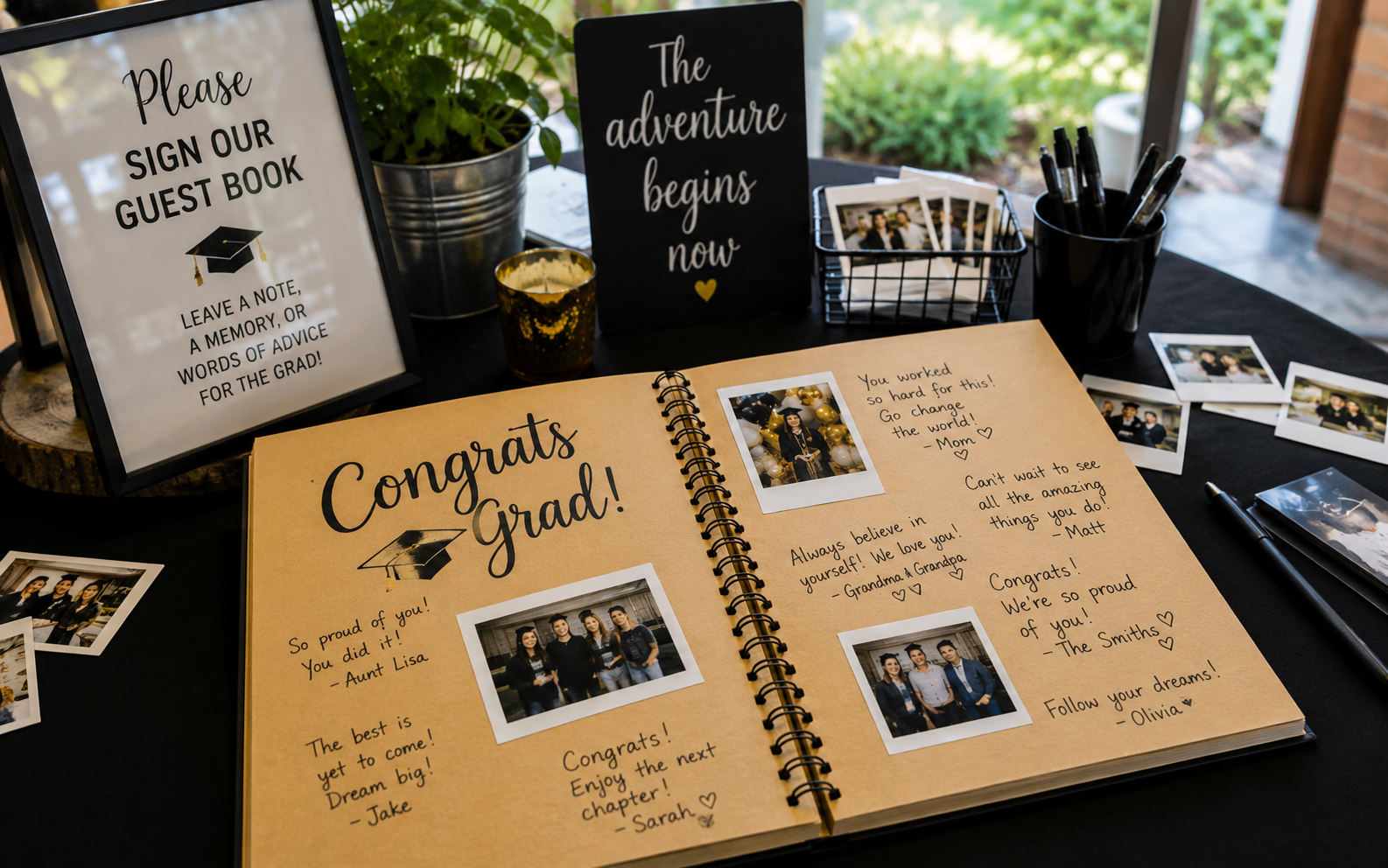
Paper guest books look lovely on the gift table. Six months later they're in a closet — half the pages blank, the signatures illegible, and not one message from the uncle who flew in from out of state.
Graduation deserves better than that. Here are 15+ graduation party guest book ideas — physical, creative, and digital — chosen so the grad actually keeps what people said, not just a shelf of dusty signatures.
Physical guest book ideas
Tactile options that double as decor or keepsakes:
- Classic sign-in book — simple and cheap ($15–$25). Add a prompt so you get more than a name: "One piece of advice" or "Favorite memory with [name]."
- Sign a cap — guests write on a spare mortarboard with gold paint pens. Display-worthy and grad-specific.
- Jenga guest book — permanent marker on Jenga blocks; build the tower during the party and play with it later, messages and all.
- Photo-mat frame — guests sign the mat around an 8×10 grad portrait; frame it for the dorm wall.
- Globe or map — "Write where you're from" or "Where you hope the grad goes next."
- Advice cards in a jar — pre-cut cards, one thought each, read aloud later.
- Yearbook-style pages — "Most likely to…" superlatives guests fill in.
- Wooden sign — a rustic board everyone signs; hangs in the grad's apartment.
- Baseball or basketball — for sports grads, everyone signs the ball.
- Thumbprint tree — fingerprint "leaves" with names; a hit at family-heavy parties.
Creative twists
- Video guest book station — a tablet on a tripod recording 30-second messages (needs someone to manage the queue).
- Polaroid wall — guests take an instant photo, write a note, and pin it to a board.
- Wishes on ribbon — guests write on ribbons tied to a "wishing tree."
- Time capsule box — sealed notes to open at their college graduation.
- QR audio guest book — guests scan and record from their own phone; no queue, no attendant, no handwriting to decipher.
Why digital wins for open houses
Open-house format means guests trickle in between 1pm and 5pm. A paper book sits on one table, and half your guests never walk past it.
A digital graduation party guest book via QR code works the moment anyone arrives. They scan, tap record, say "I'm so proud of you" — done in ten seconds. Text, audio, and video messages all land in the same gallery as the party photos, so guests participate once and you get everything in one place. That's included in Grad Moments for $49 once, not an add-on.
Paper vs digital
| Paper book | Digital QR guest book | |
|---|---|---|
| Participation | Low (rushed signatures) | High (quick phone recording) |
| Open-house friendly | Poor | Excellent |
| Keepsake value | Dust on a shelf | Audio the grad replays for years |
| Combined with photos | Separate | Same QR, same gallery |
| Legible? | Not always | Always |
| Cost | $20–$50 | Included in the $49 gallery |
Our pick for most families
If you want one thing that actually gets used: a digital guest book plus a photo gallery. Physical props like a signed cap or Jenga tower are lovely extras — keep one for fun — but the messages that truly matter come through audio and video. Years from now, the grad won't reread signatures; they'll replay grandma's voice.
Explore the graduation party guest book product page for setup details and message examples, and see how it fits the rest of the day in the graduation party ideas hub.
How to make the five best physical guest books
Sign-a-cap. Buy a spare mortarboard ($10–$15) and set out gold or silver paint pens. Add a small sign with a prompt. After the party, spray it with a clear sealant and display it on a shelf or shadow box. Why it works: it's grad-specific and genuinely display-worthy.
Jenga guest book. Grab a set of blocks and fine-tip permanent markers. Guests write a message on a block, then the tower gets played with all night — and kept afterward. Tip: buy a cheap set you don't mind writing on.
Photo-mat frame. Print an 8×10 of the grad, mount it in a frame with a wide white mat, and have guests sign the mat with a thin marker. It hangs in the dorm as art plus signatures in one. Tip: test the pen on a scrap so it doesn't bleed.
Advice-cards jar. Pre-cut cards and a decorated jar or box. Each guest writes one piece of advice; the grad reads a handful aloud near cake time and keeps the rest. Why it works: it creates a group moment and a keepsake.
Globe or map. Guests sign a globe or a framed map ("write where you're from" or "where you hope the grad goes"). Perfect for a travel-minded or college-bound grad. Tip: metallic pens show up best on darker surfaces.
A prompt bank to steal
The difference between a blank book and a full one is a good prompt. Pick a few:
- "One piece of advice for the next chapter."
- "My favorite memory of [name] is…"
- "In five years, I hope you…"
- "The thing I'll always remember about you is…"
- "The best part of watching you grow up was…"
- "A song for your next-chapter playlist."
- "One thing you should never forget."
- "Where do you think you'll be in ten years?"
Put the prompt right on the sign — it removes the "what do I even write?" freeze that leaves paper books half-empty.
Setting up a digital guest book, step by step
A QR guest book takes about two minutes to set up and needs no attendant:
- Create your gallery and enable guest-book messages (included with Grad Moments).
- Print the QR signs — table tents plus one larger sign for the guest-book/gift table.
- Write a clear prompt on the sign: "Scan to leave a message — advice, a memory, or just hello."
- Place it at eye level near the food or gifts, not hidden behind the cake.
- Nudge the first few guests so the momentum starts; after that it's self-serve.
- Review messages afterward, and (optionally) turn on approval if you want to screen for pranks.
Guests scan, tap record, and leave a text, audio, or video message in seconds — all in the same place as the photos.
Keeping the messages after the party
The point of a guest book is what happens later. With a digital one, you can:
- Replay audio and video anytime — grandparents' voices are the entries families treasure most.
- Export a transcript or the clips to save alongside the photos.
- Print the written messages into the photo album so text and pictures live together.
- Pull one or two lines into thank-you notes as a personal touch.
Physical books get one advantage here: they sit on a shelf as an object. The trade-off is that nobody replays a shelf — so many families keep a signed cap as the display piece and the digital book as the one they actually revisit.
Match the guest book to the grad
- High school: a bigger, family-heavy crowd means lots of advice and nostalgia — the advice jar and audio messages shine.
- College and advanced degrees: an older group gives more heartfelt, reflective messages; video works beautifully.
- Open house: digital wins outright, because guests arrive across hours and a single paper book gets missed by half of them.
Moderation and privacy
If you're worried about inappropriate entries (it happens with teen crowds), a digital guest book lets a parent approve each message before it appears, and you control who can see the gallery. A paper book has no such safeguard — whatever gets written, stays written. For most families the approval toggle is peace of mind worth having.
Why the messages matter more than you think
It's easy to treat the guest book as a checklist item — buy the book, set out the pen, done — but the entries are one of the few parts of a graduation party that genuinely grow in value over time. The food gets eaten, the decorations come down, and even the photos, wonderful as they are, capture how things looked. The guest book captures how people felt: the advice from an uncle who's been where the grad is headed, the memory a childhood friend shares, the pride a grandparent puts into words they might never say out loud otherwise. Years from now, when the grad is deep into college or a first job and wondering whether they're on the right path, those messages become something they return to. That's a much bigger deal than a shelf decoration, and it's worth setting up the guest book with that weight in mind rather than as an afterthought on the gift table.
This is also the honest case for going digital, or at least adding a digital option alongside a physical keepsake. A signature in a book is a name; a thirty-second video of grandpa saying "I've watched you become someone remarkable" is a treasure the family will replay for decades. Audio and video carry tone, laughter, and the specific sound of a person's voice — things ink on a page simply can't hold. The grad who rolls their eyes at the idea of a guest book today will, at some point down the road, be profoundly grateful that someone captured what these people had to say while everyone was together in one room. Setting it up well is a small effort now for something that only becomes more precious as the years pass.
Getting shy guests to participate
The quiet failure of most guest books is low participation — people mean to sign or record, then get pulled into conversation and never do. A few deliberate choices fix this. Place the guest book where guests naturally pause, like right by the food or the drinks, rather than tucked in a corner they have to seek out. Write a specific prompt, because "leave a message" freezes people while "share one piece of advice for the next chapter" gives them an easy on-ramp. Ask a few outgoing guests early in the party to go first, since seeing others participate gives everyone else permission. And keep the mechanism effortless — with a QR guest book, a guest can scan and record from wherever they're standing in the time it takes to finish a drink, which removes the "I'll do it later" excuse that leaves paper books half-empty. The families who get warm, full guest books aren't lucky; they just made participating easy and gave people something clear to say.
Guest book ideas for every budget
Guest books span an enormous range of cost and effort, and the right choice depends as much on your budget and style as on anything else. At the lowest end, a simple sign-in book or a stack of advice cards in a decorated jar costs well under twenty dollars and takes no setup — you write a prompt, set out pens, and you're done. These budget options work perfectly well; a jar of handwritten advice cards is genuinely touching and costs almost nothing. In the mid-range, keepsake-oriented books like a signable mortarboard cap, a photo-mat frame around a grad portrait, or a signable wooden board run twenty to fifty dollars and give you something displayable afterward rather than a book that goes in a drawer. These strike a nice balance between cost and lasting value, since they double as décor in the grad's room.
At the higher end sit the custom and digital options. A professionally printed custom guest book with the grad's photos, or an elaborate signable object like a globe or a large framed piece, can run higher but delivers a polished, personal result. The digital guest book occupies an interesting spot in this spectrum: rather than being a separate purchase, it comes bundled into a photo gallery service, so for the price of your gallery you get audio, video, and text messages alongside your photo collection with no additional per-guest cost. That makes it one of the better values available, because you're not choosing between spending on photos and spending on a guest book — one setup covers both. Whatever your budget, the principle holds that participation matters more than production value: a cheap jar of advice cards that fills up beats an expensive book that stays mostly blank, so choose the option you'll actually get guests to use.
Coordinating the guest book with your photos and party flow
A guest book works best when it's woven into the rhythm of the party rather than parked in isolation on a side table, and the smartest way to do that is to connect it to your photo collection. When the same QR code that gathers photos also captures guest-book messages, guests participate in a single, effortless action — they scan once and can both upload a photo and leave a message — which dramatically increases how many people do both. It also means your photos and messages live together in one place, so when you look back you're not hunting through a separate book and a separate photo folder; the memory and the words that accompany it sit side by side. This integration is a big part of why a combined gallery-and-guest-book setup outperforms treating the two as separate projects.
Placement and timing within the party flow matter just as much as the mechanism. Position the guest book prompt where guests naturally pause and linger — near the food, the drinks, or the memory display — rather than tucked in a quiet corner they have to seek out, because proximity to where people already are drives participation more than anything else. Fold it into the natural moments of the day: a well-timed nudge as guests browse the memory table, or a gentle announcement during the toast inviting everyone to leave a message, converts good intentions into actual entries. For an open house especially, a scan-anytime digital guest book aligns perfectly with the come-and-go flow, capturing the one o'clock guests and the four o'clock guests alike, whereas a single paper book inevitably gets missed by half the crowd. Treat the guest book not as a static object but as an active part of the party's flow, connected to your photos and placed in the path of your guests, and you'll end the day with a rich collection of words to match your rich collection of images.
Related: Graduation open house guide · Photo ideas · Photo booth for graduation party · Grad Moments homepage
Frequently Asked Questions
Collecting guest photos?
Grad Moments gives your guests a QR code to upload photos and videos — no app, no login.
See How It Works